Built-in channels with a point of view
The more than 400 built-in channels range from broad genres to eras, moods, franchises, performers, studios, and useful filters such as unwatched or recently added.
Features
Bunny Ears TV creates a live, scheduled way to watch your Plex library. The guide is the front door. Channel surfing, custom programming, Radio, Weather, and careful playback controls are what make it useful after the novelty wears off.
Feature field guide
Each feature page explains the human problem, the controls, and the limits. No vague promises and no setup details hidden behind a download button.
Changing channels should not mean backing out to a wall of posters. Channel Surfer puts a compact mini guide over full-screen playback so you can look around while the current program keeps going.
A station break can make a personal channel feel programmed. Bunny Ears TV+ turns a Plex playlist, collection, or video library of short clips into reusable Bumper Groups.
The same Bunny Ears TV guide and channel lineup belongs on the big screen and in your hand. Apple TV, iPhone, and iPad each get a native interface built around the controls and space of that device.
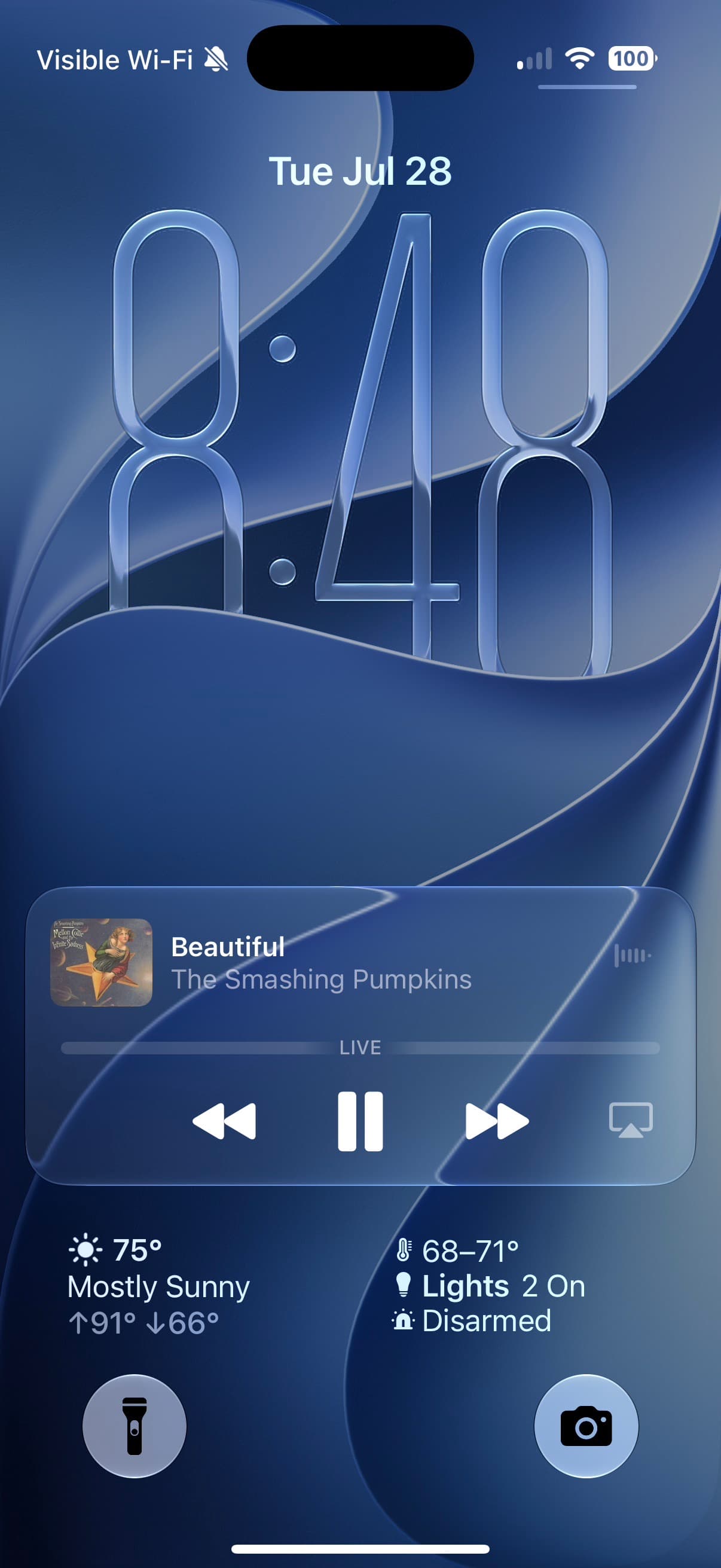
Radio should not stop because you locked your iPhone. Bunny Ears TV lets eligible audio continue in the background and through the active audio route, including connected car audio.
A shared program guide should not look the same for every person in the house. Bunny Ears TV recognizes Plex Home profiles, supports four-digit PINs, and derives an age-appropriate view from the shared guide.
I built DVR Mode for the small interruptions that happen while a channel keeps moving. On eligible video, you can pause, replay a line, move through the available program history, and get back to the live edge without leaving the television rhythm.
A healthy local network should not be punished for what might happen on cellular. Bunny Ears TV keeps verified local Wi-Fi and Ethernet on Direct Play when possible, then uses Plex delivery options when the media or route needs help.
I built Hopper for a harder playback rhythm: start a scheduled program in the middle, jump to a very different file seconds later, seek, restart, reach EOF, and leave the next channel a clean start. It is coming in the next Bunny Ears TV beta.
The screen between channels matters. Bunny Ears TV treats static, pause effects, and interface sound as useful feedback first, then gives them enough throwback character to make the app feel like television.
A large lineup needs shortcuts. Press and hold Select in the Apple TV guide, or long-press a channel on iPhone and iPad, to open the Quick Menu without climbing back through the interface.
The built-in lineup handles broad moods and familiar genres. Custom Channels are for the shelf only you would program: a comfort-show loop, a director marathon, family home videos, or October horror.
Music Video Mixtapes turns the videos already on your Plex server into a personal channel 19. Pick the sources, balance the mix, and let the next video arrive without another decision.
Weather on 20 behaves like a real utility channel in the guide. Tune in for current conditions, what is coming next, and a changing scene that reflects local weather and time of day.
A personal library becomes television when the clock matters. Bunny Ears TV schedules eligible movies, shows, music, custom stations, and utility channels into a guide that is already moving when you arrive.
The program guide
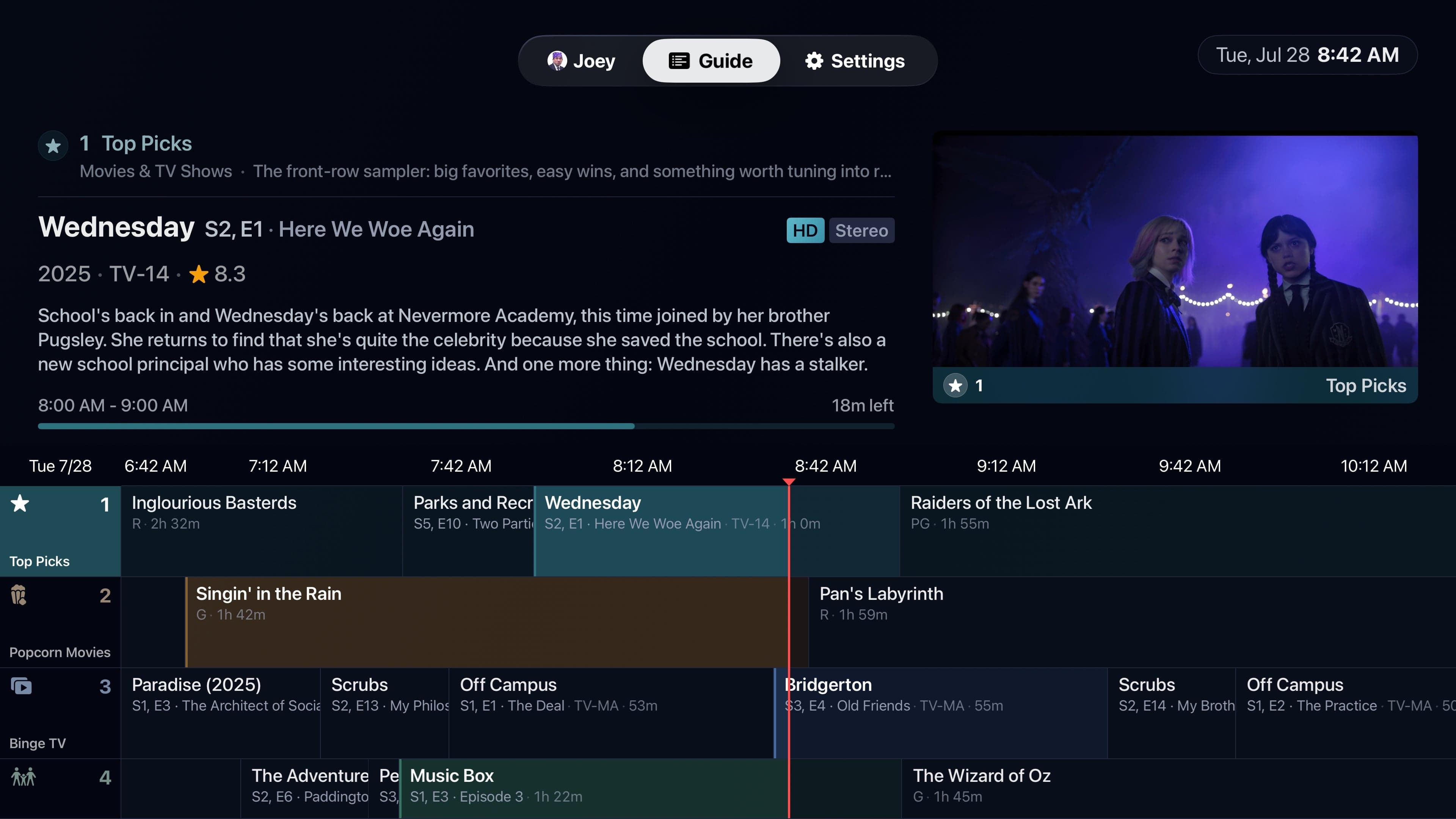
Channels run down the screen. Time runs across it. The current-time line and highlighted programs make the schedule readable at a glance.
Move through the grid to see the title, poster, description, rating, time remaining, and available media details. The tuned channel keeps playing in the preview until you select a new one.
The guide keeps four hours of history and 28 hours ahead, then extends before the future window runs out. Favorites, package filters, My Channels, and three sort orders help a large lineup stay manageable.
Built-in programming
Bunny Ears TV uses your Plex metadata and local matching to build a lineup that reflects what you actually own.
The more than 400 built-in channels range from broad genres to eras, moods, franchises, performers, studios, and useful filters such as unwatched or recently added.
A custom classifier trained on more than 300,000 media records works with deterministic Plex metadata rules. Classification happens locally instead of uploading your catalog.
Channels without enough matching content can stay hidden. The app preserves the last usable guide if a refresh cannot finish cleanly.
17 packages keep related channels together. The 26-channel Basic package stays available without Bunny Ears TV+.
Music and weather belong in the lineup
68 Radio stations
Genre, style, mood, artist, and era shape the stations. Playback shows album art, track, artist, album, and progress.
Take Radio into the background →Channel 19
Mix music videos from the Plex playlists, collections, and libraries you choose. Control source balance and artist spacing, then add optional Song IDs, Fresh Drop picks, and Artist Spotlight sets.
Uses your videos. Bunny Ears TV does not provide a music video catalog.
Program channel 19 →Channel 20
See current conditions, hourly and extended forecasts, almanac-style views, a weather narrative, and a ticker. The scene changes with the local weather and time of day.
Uses Apple Weather. The location choice is stored per device, and an optional soundtrack comes from your Plex music library.
Tune into Weather on 20 →My Channels
300
Custom slots
700-999
Channel range
Plex custom channels
Name the channel, choose an icon and color, then decide whether programs run in order or shuffle. Television-heavy channels can use episode blocks so one series does not take over the schedule.
Bunny Ears TV+ supports up to 300 custom channels. Reorder them without reshuffling existing schedules, refresh one source at a time, and keep the last usable content if a temporary refresh fails.
Optional Ad Bumpers can place short clips from your own Plex sources between programs. Bunny Ears TV does not insert third-party ads.
Playback
Files, routes, displays, and households vary. Bunny Ears TV gives those differences names and settings instead of claiming every stream behaves the same way.
Pause eligible live video, skip 15 seconds, restart the program, scrub the timeline, use Plex thumbnails when available, and return to the live edge.
Choose audio tracks and subtitles in the player. Set preferred languages, subtitle behavior and size, plus Best Available or Stereo output.
Set video and audio quality separately for Wi-Fi, Ethernet, Cellular, and 5G where applicable. Auto protects healthy local Direct Play and can adapt on harder routes.
Use HDR Match Content, On, or Off on supported hardware. Apple TV also offers fixed refresh-rate choices for viewers who want fewer display switches.
Playback may use Direct Play, Direct Stream, or a Plex-provided adaptive transcode. The result depends on the media, route, quality choice, device, and server capabilities.
One app family
A focus-driven guide, Siri Remote navigation, television-scale playback, Channel Surfer, display controls, and a separate Ethernet quality profile.
Portrait and landscape guide layouts, touch controls, separate Cellular and 5G profiles, background audio, and Lock Screen or Control Center metadata.
The complete touch experience with roomier guide, playback, settings, and editor layouts in portrait or landscape.
Compatible guides, favorites, packages, custom-channel settings, and other household choices can sync through iCloud. Network, display, location, and other device-specific choices stay local.
Start with Basic
The Basic package stays free. Bunny Ears TV+ includes all 16 premium packages, DVR Mode, Custom Channels, and Ad Bumpers.

Eligible monthly and annual subscriptions include a 14-day introductory trial. Subscriptions give this independent project steadier resources for development and support. Lifetime remains available for people who prefer the Plex-style one-time option. Prices vary by country. Current products support Family Sharing.
Install Bunny Ears TV, connect Plex, and let the first guide build from the libraries you choose.